
Jai Club Disclaimer
This Jai Club disclaimer explains what the Jai Club website does and what it does not do. The website explains the games, registration, deposits, withdrawals and bonuses. Every real-money action, from your first deposit to a Win Go bet, happens inside the Jai Club app, never on these pages.
Read this before you sign up or add money. It tells you where responsibility sits, why you should always check the live app before you act, and which risks belong to you as a player.
Inside This Page
What The Jai Club Website Does And Does Not Do
The Jai Club website gives information only. It does not hold your balance, take deposits, process withdrawals or run any game round. Your account, your Wallet and your bet history all live inside the app.
The reason is simple: when a problem comes up, this website has no view into your account and cannot sort it out. If a deposit is missing or a withdrawal is stuck, go to the Account page in the app and open Customer Service. Have your order details handy.
No one linked to this website will ever ask for your password, OTP or UPI PIN. The app also says its support staff never message members with links, so treat any link-bearing message claiming to come from them as a scam.
Helpful Hint: Save your deposit order number and the UPI reference from your payment app before you contact Customer Care.
Information Can Change Inside The App
Jai Club may alter its limits, bonus terms and features without any notice. Its own event rules let the platform change or close a campaign whenever it wants, so a figure noted down today might not hold next month.
Treat every amount on this website as a starting point. Before you deposit, open the Deposit page and read the range on your chosen tile. Before you withdraw, check the time window and the daily count on the Withdraw screen.
Why Bonus Terms Need A Second Look
Bonus conditions decide whether a reward ever becomes money you can withdraw. Events such as First Deposit, Lucky Roulette or the invitation reward each carry their own rules, deadlines and claim limits, and these sit on the event page inside the app.
Many people grab a bonus first and go through the terms afterwards, which is a mistake. Read the rule page first, note the expiry date and any betting requirement, and only then make your choice. Event bonuses you have not claimed disappear when the event closes.
What To Do If The App Differs From This Website
Always follow the app. The screen you see when you are logged in shows the live rule, and that is the one applied to your account and money.
If a difference looks serious, such as a changed minimum or a missing payment method, ask Customer Service inside the app before you send money. A two-minute question costs far less than a stuck order.
Real-Money Risk And The 18+ Rule
Jai Club is open only to players aged 18 and above, and every game involves real money. Colour prediction, K3, 5D, slots, crash games like Aviator and live casino tables all produce random results. Past results, charts or patterns cannot tell you what will happen next.
Decide how much you can spend before opening the app, and quit once that amount is finished. For example, if you put in ₹500 for the evening and lose it, do not deposit another ₹500 to recover it. Trying to win back losses is the quickest way for beginners to drain their account.
Every Indian state has its own laws on gaming played for real money, so check what your state permits before you start. Nothing on the Jai Club website should be taken as legal or financial advice, and no page promises that you will win.
- You are 18 or older
- Real-money gaming is allowed in your state
- You have fixed a budget you can afford to lose
- You understand every result is random
Helpful Hint: Once gaming no longer feels enjoyable, pause for a few days and delete any payment details saved on your phone.
Jai Club Hack And Fake Predictor Apps
There is nothing like a Jai Club Hack. Anyone who pushes a hack or a result predictor on you through an app, a Telegram group or a website is running a scam, and the aim is to take your money or your login details.
These sellers usually ask for a fee, your Jai Club login password or your OTP. Once they have it, they can withdraw your balance or lock you out. Never share your password, and never install files that promise sure wins.
How To Spot A Fake Jai Club App
A fake app usually arrives as a link in a chat or message rather than from the download button on the homepage. The app's own notice says customer service never sends links, so any link claiming to be support is suspect.
Download only through the button placed at the top right of the home page. If an app asks for permissions it does not need, or the login page looks slightly wrong, uninstall it and change your password.
Protecting Your Account And Payment Details
Keep your account safe by never sharing your password or UPI PIN with anybody. On the Add UPI screen, the app also warns you not to use your mobile number as your UPI ID, because doing so can leave you exposed to fraud.
Add only those bank accounts and UPI IDs that are in your own name. After the first payout account is saved, the name gets locked, and each withdrawal method added later must show that same name, so a mistake at this stage is hard to correct.
Registration, The Jai Club Invite Code And Links
An account cannot be created unless you fill in the Invite Code field, as it is mandatory. While you Jai Club Register, type 385987864126 in that field. After that, provide your phone number, a password and the OTP that arrives on your phone.
If you sign up through certain links on the Jai Club website, a commission may be earned. The information on the pages stays the same either way. Before deciding whether to join, you can read more on the Jai Club home page.
- Open the Register page in the app
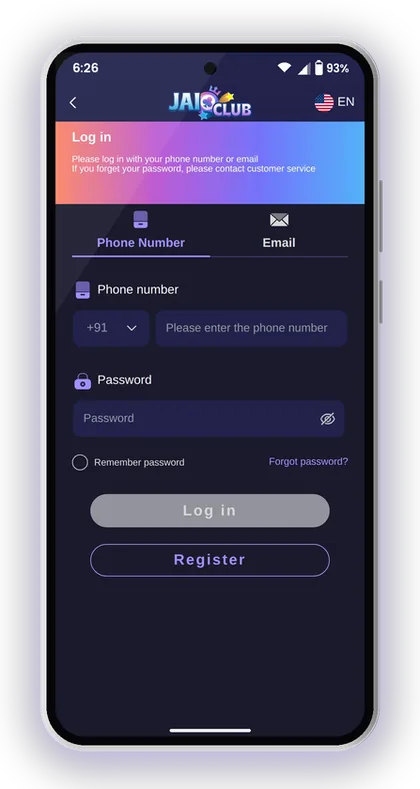
- Enter your phone number with +91
- Set and confirm your password
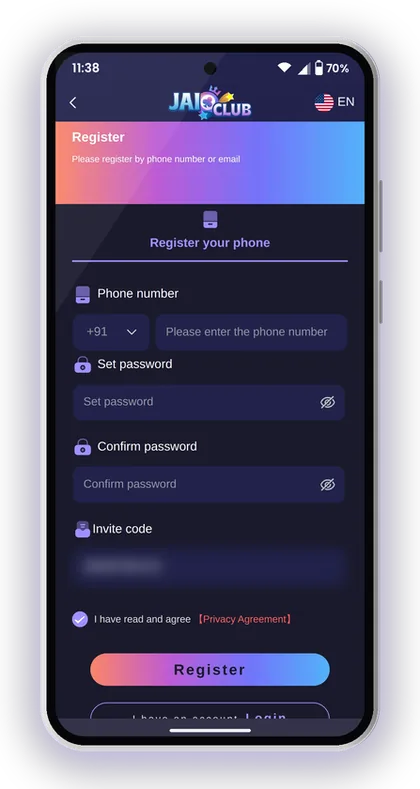
- Enter 385987864126 in the Invite Code field
- Tap Send, enter the OTP and accept the Privacy Agreement
- Tap Register
Helpful Hint: Use a strong password with big and small letters and numbers, and do not reuse your email or UPI password.
Payments And Responsibility For Your Money
The app and its payment partners process deposits and withdrawals, not this website. The recharge instructions in the app are firm: the amount you pay has to be the same as the order you created, and an order should not be cancelled once payment is made.
Wrong details cost money. If you send a different amount or enter an incorrect bank account, the platform says it is not responsible for the loss. Check the IFSC code, account number and UPI ID twice before you save them.
Keep records of every payment until it shows in your Deposit history or Withdrawal history. Screenshots of the UPI receipt or the USDT hash give Customer Service what they need to trace a delayed transaction.
Helpful Hint: For USDT, confirm the network on the deposit screen before sending; coins sent on the wrong network may not be recovered.