
Jai Club Withdrawal Time, Limits And Steps To Withdraw
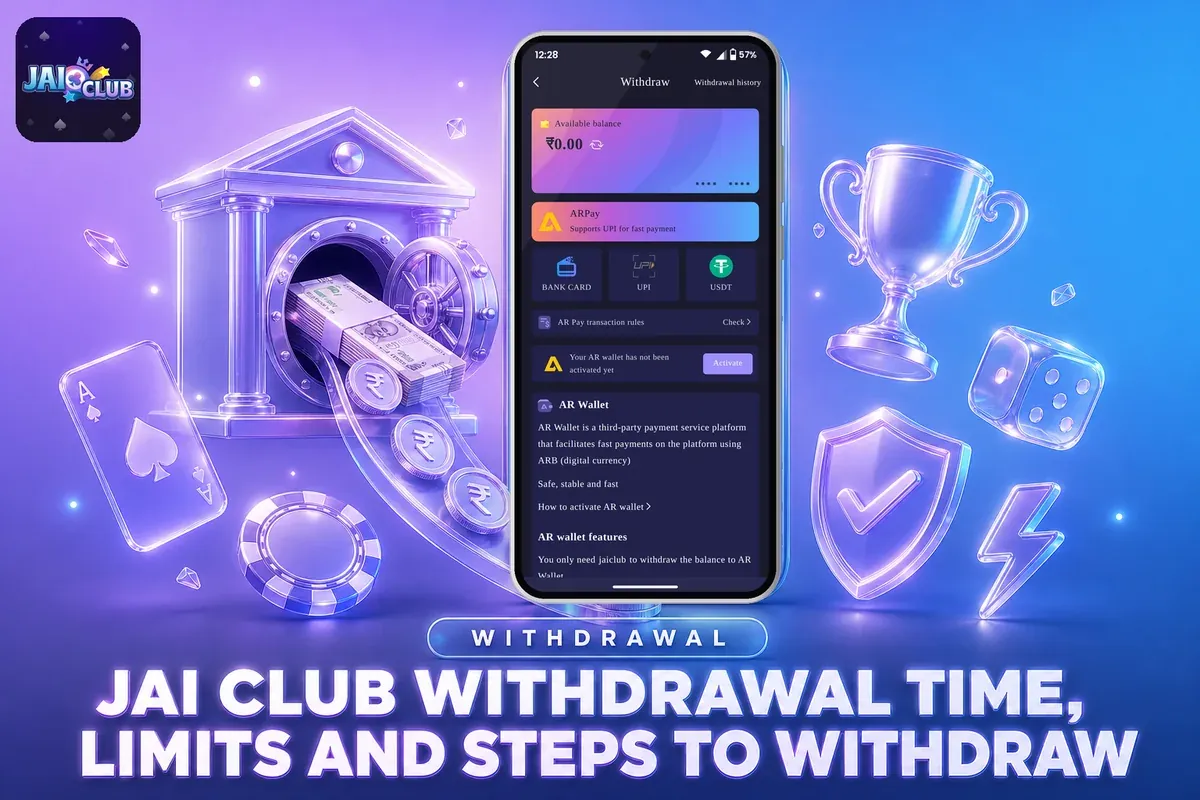
The time window for a Jai Club withdrawal varies by method. UPI requests are accepted round the clock, from 00:00 to 23:59, whereas bank card and USDT requests can be placed only between 00:10 and 23:50. Each day allows 3 withdrawal requests, and the amount of every request must stay within the limits set for that method.
The app does not promise a fixed arrival time, so how fast you get your money depends mostly on getting the details right the first time. On apps like this, most delays come from a wrong IFSC code, a name that does not match, or betting that is not yet complete.
Before your first request, bind one withdrawal account: a bank account, UPI ID or USDT address. The name you save first gets locked for every method after it. If you still need an account, set it up from the Jai Club homepage first and come back here when your balance is ready to withdraw.
- Minimum Withdrawal
- ₹100 by UPI
- Maximum Per Request
- ₹50,000 (UPI, bank)
- UPI Hours
- 00:00–23:59
- Bank And USDT Hours
- 00:10–23:50
- Requests Per Day
- 3
- Payment Methods
- UPI, Bank, USDT, ARPay
Inside This Page
Jai Club Withdrawal Time And Daily Limits By Method
Only UPI withdrawals are available all day, from 00:00 to 23:59. For bank card and USDT, requests are accepted from 00:10 to 23:50, which means both methods stay shut for a few minutes around midnight.
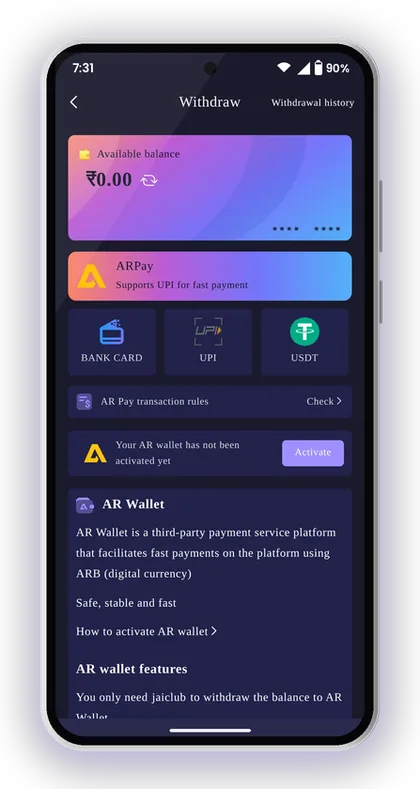
All methods share the same cap of three requests a day. The withdraw screen shows a counter of the withdrawals you have left today, and it goes down by one each time you send a request.
The amount matters as much as the time. A ₹105 request goes through by UPI but fails by bank card, where the minimum is ₹110. USDT does not accept anything under ₹1,000.
| Method | Withdrawal Hours | Minimum | Maximum | Requests Per Day |
|---|---|---|---|---|
| UPI | 00:00–23:59 | ₹100 | ₹50,000 | 3 |
| Bank Card | 00:10–23:50 | ₹110 | ₹50,000 | 3 |
| USDT | 00:10–23:50 | ₹1,000 | ₹1,000,000 | 3 |
How Long Does A Jai Club Withdrawal Take?
The app does not list a fixed processing time for UPI or bank withdrawals, so be careful with any time promise you see in Telegram groups. What it does give you is a status for every request under Withdrawal history, and that is the only reliable place to track your money.
For USDT, one rule stands out. Once you withdraw, the transfer must collect three confirmations on the blockchain main network before the funds arrive in your wallet. So even after the request has left your account, you may have to wait briefly while the network confirms it.
Best Time Of Day To Send A Withdrawal Request
Send your request well inside the window. Do not wait until 23:49 for a bank card or USDT withdrawal. A request sent just before closing leaves you no time to fix a typing mistake, and the next window opens only after 00:10.
Plan around the daily cap as well. To withdraw ₹1,20,000 by bank card, you need three requests: two of ₹50,000 and one of ₹20,000. That uses all three of your daily slots. If one of them comes back because of a wrong detail, you may have to finish the next day, so check the counter before you send again.
Helpful Hint: Try to keep one daily request free, so a correction does not have to wait until tomorrow.
How To Withdraw Money From The Jai Club App
You withdraw from the Wallet section: tap Wallet, then Withdraw, choose a method, and enter the amount and your login password. Once your withdrawal account is already saved, the request itself is short.
Your total deposit amount and total withdrawal amount are also visible on the Wallet page, next to the balances of your main wallet and 3rd party wallet. Confirm that the funds you want to take out are in the main wallet. If money is lying in a 3rd party game wallet, you might have to move it to the main wallet first.
Follow these steps in the Jai Club App:
- Launch the app, then sign in using either your registered mobile number or your email address.
- Tap the Wallet icon at the bottom of the screen.
- Tap Withdraw and choose Bank Card, UPI, USDT or ARPay.
- Pick the bank account, UPI ID or USDT address you have already saved. If nothing is saved yet, add a new one.
- Enter a withdrawal amount within that method's range.
- Check that your remaining total bet shows 0.
- Enter your login password and submit the request.
- Open Withdrawal history to follow the status.
Why The Login Password Is Asked At The Last Step
The login password is the final check that you are the person withdrawing the money, not someone who picked up your unlocked phone. It is the same password you use on the Jai Club login page, so if you forget it, you cannot withdraw either.
Many players let the browser save the password and then forget it. Reset it before the day you need your money. A reset needs an OTP sent to your registered number, and any SIM problem at that moment adds one more delay.
Taking A Jai Club Withdrawal Screenshot For Your Records
Take a screenshot of the Withdrawal history entry right after you submit. It records the request exactly as the app saw it, including the amount and the method, and it is the first thing support usually asks for when a request is late.
When the money lands, keep your bank SMS or UPI app notification with it. If your Jai Club withdrawal screenshot and your bank statement ever disagree, you already have both sides of the record. You will not have to search through old messages under pressure.
Helpful Hint: Move any winnings from game wallets back to the main wallet before you open Withdraw, so your full balance shows.
Withdrawal Requirements To Check Before Your First Request
A withdrawal goes through only when four things are in place: a registered account, a saved withdrawal account, a cleared betting requirement and an amount inside the limits. If any one of these is missing, the request stops on the screen.
Start with your account. To register, type the Jai Club invite code 385987864126 into the Invite Code field. A phone number verified through OTP is also required, along with an 8-character password that mixes capital letters, small letters and numbers.
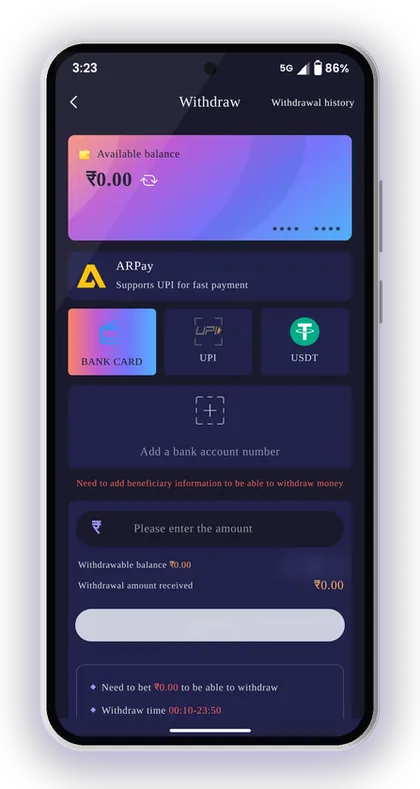
The bank card screen makes the next rule clear: you have to add beneficiary information before you can withdraw. Until you save an account, the app has nowhere to send your money.
- Account registered with invite code 385987864126 and phone number verified
- One bank account, UPI ID or USDT address saved in your real name
- Remaining total bet shows 0
- Amount inside the method's minimum and maximum
- Request sent within the method's withdrawal hours
- At least one of your 3 daily requests left
- Login password ready
What Does Total Bet 0 Mean Before Withdrawing?
According to the app's Beginner's Guide, your total bet needs to be 0 before a withdrawal is possible. In apps like this, that number shows the betting still pending against your deposit or bonus amount, and it reduces as you place bets.
So if you deposit ₹500 and try to withdraw it within the hour without playing, expect the request to be blocked. Before you accept any Jai Club bonus offer, check its rules, because bonus money often adds to the betting you must finish.
Why Your Account Name Gets Locked
Once you save the name for your first withdrawal account, it cannot be changed, and all withdrawal methods added later must carry that same name. This prevents another person from linking their own bank account to take out your balance.
A common mistake is typing a nickname or short form like 'Raju K' when the bank lists 'Rajesh Kumar'. Type your full name exactly as it appears in your bank passbook. If the saved information turns out to be wrong, the only fix is through customer service.
Helpful Hint: Check the total bet figure before you open Withdraw. Most blocked first withdrawals come down to this one rule.
How To Add A Bank Account For Withdrawals
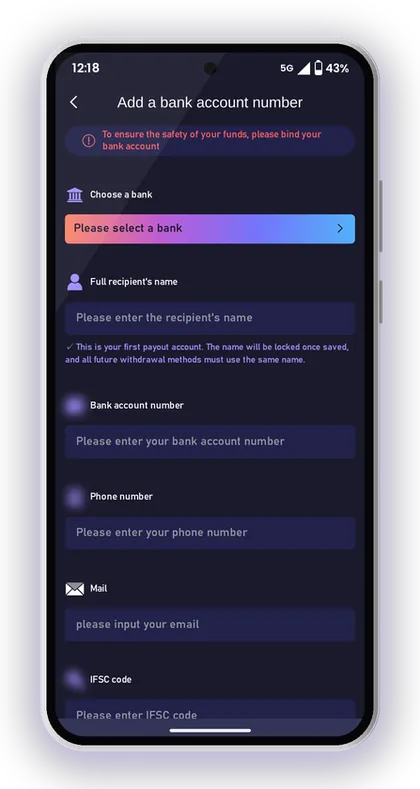
To bind a bank account, open the Withdraw screen, tap Add Bank and fill in six fields. The app says this keeps your funds safe, and the bank card tab will not accept a request until it is done.
The app also makes it plain that it accepts no liability for losses caused by wrong bank details. Even one incorrect digit can send the money to someone else or get the transfer bounced back. Match every number against your passbook or banking app before you hit Save.
- Tap Wallet, then Withdraw, then Bank Card.
- Tap Add a bank account number.
- Choose your bank from the list.
- Type the recipient's complete name just as your bank records show it.
- Enter your bank account number.
- Add your phone number and email.
- Enter the IFSC code of your branch.
- Tap Save.
Common IFSC And Account Number Mistakes
The most common error is an old IFSC code after a bank merger or a branch change. Copy the IFSC from your current cheque book or banking app, not from memory or an old screenshot sent by a relative.
Another mistake is mixing up 0 and O, or missing a digit in a long account number. Read the number slowly, one digit at a time, against the source. If you find an error after saving, contact support before you send any withdrawal to that account.
Can You Withdraw To Someone Else's Bank Account?
In practice, no. The first name you save is locked, and every later method must match it. A family member's account under a different name will not fit, however close the relationship.
Players usually try this when their own bank has a low daily limit. A better option is a UPI ID linked to an account in your own name, or ARPay, which the app offers for players who keep running into bank limits.
Helpful Hint: Save the bank account on a day when you are not in a hurry, then test it with a small first withdrawal close to the ₹110 minimum.
How To Bind UPI And Withdraw To Your UPI ID
UPI withdrawals need a saved UPI ID. Open Withdraw, tap UPI, then Add UPI, and fill in your UPI name, phone number and UPI ID. You type the UPI ID twice, so the second field catches any typing mistake before you save.
UPI suits most players because it is the only method open all day and has the lowest minimum at ₹100. It works with the UPI ID from any app you already use, such as PhonePe, Google Pay or Paytm.
- Tap Wallet, then Withdraw, then UPI.
- Tap Add UPI.
- Enter your UPI name, the same name that is locked on your first withdrawal account.
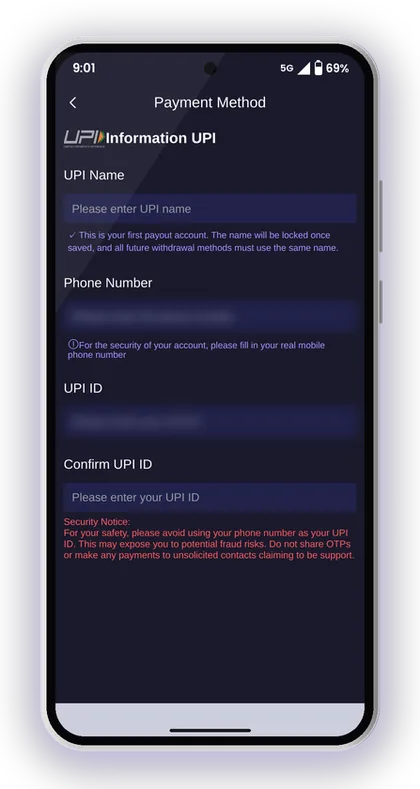
- Enter your real mobile phone number.
- Type your UPI ID, then type it again in Confirm UPI ID.
- Tap Save, then go back to the UPI tab to withdraw.
Should Your Phone Number Be Your UPI ID?
No. The app itself advises against it. A UPI ID made from your phone number tells anyone who sees it how to call or message you, and that makes you an easy target for fraud calls from people pretending to be support.
Many UPI apps allow you to make an ID that doesn't use your phone number, for example one based on your name. Use that kind of ID here. Also heed the warning on the same screen: do not share an OTP, and do not pay anyone who approaches you posing as support.
What If The UPI Name Does Not Match?
If your UPI app shows a different name from the one locked in your account, the withdrawal may fail. Before you save the ID, open your UPI app and check which name is linked to it.
This usually happens when the UPI ID is linked to a joint account or to an account belonging to a relative. Pick a UPI ID attached to a bank account in your own name, so the name matches on both ends.
Helpful Hint: Send ₹1 to your own UPI ID from another app first. If the name shown is yours, the ID is safe to save.
USDT Withdrawal: Address, Network And Confirmations
USDT withdrawals go to a crypto wallet address that you save under Add address, on the TRC main network. The range is much wider here, from ₹1,000 up to ₹1,000,000 (10 lakh) per request, so this method is mainly useful for large amounts.
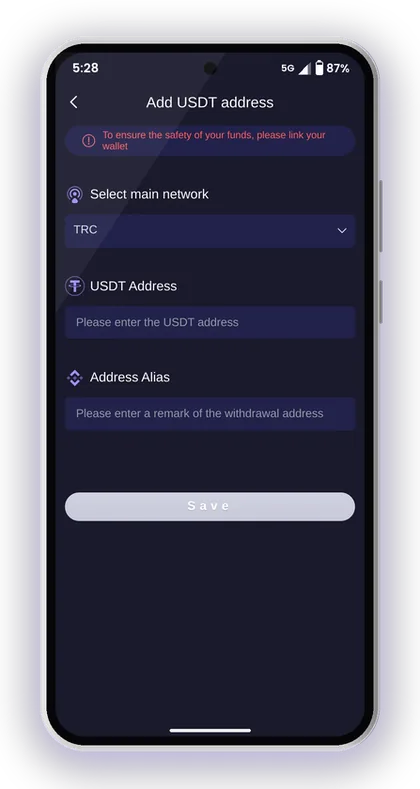
To bind an address, open Withdraw, tap USDT, then Add address. Select the TRC main network, paste your USDT address, give it an address alias you will recognise, and tap Save.
When you withdraw, the transfer needs three confirmations on the blockchain main network before it appears in your wallet. After that, you must sell the USDT on your exchange to receive rupees, so it takes one more step than UPI.
Why The Network Must Match Your Wallet
Every USDT address belongs to one network. If your exchange gives you a BEP20 address and you save it where TRC is expected, the coins may never arrive and may be impossible to recover.
Before saving, open your exchange's receive screen, choose USDT on TRC20 and copy that exact address. Always paste it instead of typing it, and check that the first and last four characters match.
UPI Or USDT For A Large Withdrawal?
For amounts up to ₹50,000, UPI is simpler because the rupees go straight to your bank with no exchange step. Above that, three UPI requests limit you to ₹1,50,000 a day, while a single USDT request can go much higher.
The downside is the conversion. USDT prices move, exchanges charge fees, and selling for rupees takes extra time. Choose USDT only if you already use a crypto exchange and are comfortable with it.
Helpful Hint: Use the address alias to note which exchange each address belongs to, so you never withdraw to an old wallet by mistake.
ARPay And AR Wallet: Another Way To Withdraw
ARPay is the fourth way to withdraw. Your balance goes to AR Wallet, an outside payment service based on a digital currency named ARB. You need to activate AR Wallet beforehand, and until you do, the tab shows a message saying your AR wallet is not activated.
After activation, withdraw your Jai Club balance into AR Wallet. Next, sell ARB through UPI within AR Wallet to receive rupees in your bank. The app also talks about additional rewards for selling in this manner.
Players mainly use it because of bank limits. You sell to UPI only when you actually need the money, so your bank sees fewer gaming transfers. Deposits back through ARPay are described as taking about 5 seconds.
The catch is that you need one more app, one more account and one more set of rules. Read the AR Pay transaction rules on the tab before you activate it, and check the current limits there.
Helpful Hint: Activate AR Wallet only if your bank often blocks or limits transfers. For most players, plain UPI means fewer steps.
Jai Club Withdrawal Pending Or Not Received: What To Do
A pending withdrawal usually means the request is still being processed or is waiting for a check. First, open Withdrawal history to make sure the request was actually submitted, and note its current status.
Then go through the likely causes one by one before you contact anyone. Most problems fall into one of the three cases below, and each one has a different fix.
Request Shows Pending For A Long Time
Wait a while, and do not send a second request for the same money. Duplicate requests use up your three daily slots and make your record harder for support to trace.
When the Jai Club withdrawal pending status stays unchanged for a long time, reach out to Jai Club customer care using the Customer Service option in your account. Send a screenshot of the request, your registered phone number and the method you used.
Withdrawal Shows Success But Money Has Not Arrived
Check the statement in your bank or UPI app, not only your SMS, because alerts sometimes come late. For USDT, all three network confirmations have to finish before the coins appear in your wallet.
If you still see nothing, compare the saved account number, IFSC or UPI ID with your real details. A wrong detail is the most common cause. Because the app does not take responsibility for wrong bank details, report it right away.
Request Rejected Or Blocked On The Screen
A blocked request usually comes down to one rule: total bet not yet at 0, an amount outside the range, the method's hours closed, or no daily requests left. Read the message on the screen, fix that one thing and try again.
Do not mix this up with deposit problems. If money you paid in is missing from your balance, follow the Jai Club deposit steps instead. Deposit problems have their own fixes, such as transferring the exact amount of the order.
Helpful Hint: Write down the date and time of every request you send, because support will ask for it first.
Safe Withdrawal Habits And Scam Warnings
Members never receive links from Jaiclub customer service. Suppose someone on WhatsApp or Telegram sends you a link, says they are from support and offers a faster withdrawal. Do not open it. Verify anything you need only on the Jai Club official website.
There is no Jai Club Hack that releases a stuck withdrawal, raises your limit or tells you Win Go results in advance. Apps and agents selling such tools are scams. They want your login password, your OTP or a so-called processing fee.
Decide on a spending cap before depositing, and set part of each win aside rather than wagering all of it once more. Lottery, crash and casino games give random outcomes, and only players who are 18 or older may take part. Stake only what you can afford to lose.
- Do not share your OTP or login password with anyone, even those who say they are support.
- Choose a UPI ID that differs from your mobile number.
- Save withdrawal details only in your own name.
- If you suspect that someone else has seen your login password, change it from Settings.
- Ignore anyone who offers to clear the total bet requirement for a fee.
Helpful Hint: Withdraw a fixed share of every win, such as half, before you place your next bet.
Players Often Ask
What is the Jai Club withdrawal time for UPI?
You can submit a UPI withdrawal request at any hour from 00:00 to 23:59. The app doesn't show a set processing time, so follow your request's progress in Withdrawal history.
What is the daily limit on withdrawal requests?
You get 3 withdrawal requests per day. The withdraw screen shows how many you have left today. Try not to send duplicate requests, because each one uses up a slot.
What is the minimum withdrawal amount?
The minimum is ₹100 by UPI, ₹110 by bank card and ₹1,000 by USDT. UPI and bank card allow up to ₹50,000 per request, and USDT allows up to ₹1,000,000.
Why can I not withdraw right after a deposit?
According to the app's guidance, your total bet needs to be 0 before a withdrawal is possible. On apps like this, that usually means some wagering on your deposit or bonus amount is yet to be completed. Check the total bet figure before you try again.
Why is my withdrawal still pending?
It may still be processing, or the details you saved may need a check. Do not send the same request again. If the status stays the same for a long time, contact customer service with a screenshot of the request and your registered phone number.
Is it possible to edit the account holder name linked to my withdrawals?
Once saved, the name you give for your first withdrawal account cannot be changed, and each method you add later must use that identical name. Saved the wrong bank details? Reach out to customer service and ask them to correct it.
Is an invite code required before I request a payout?
Withdrawals need a registered account, and signing up requires an invite code. While registering, type 385987864126 into the Invite Code field, then verify your phone number with an OTP.
Is there any app that speeds up Jai Club withdrawals?
No. Any tool or agent claiming to speed up withdrawals or give you game results is a scam. The app's customer service never sends links, and withdrawals only go through the normal Withdraw screen.
Continue Reading
How to deposit at Jai Club via UPI, USDT and ARPay, with the ₹100 minimum, ₹50,000 UPI limit, recharge rules and what to do if funds don't show.

Jai Club customer care: find Customer Service in the app, share the right details for deposit or withdrawal issues, and spot fake support links.
Jai Club login steps for phone or email, password rules, OTP reset, app vs browser sign-in and fixes for common errors. New? Use invite code 385987864126.

Jai Club bonus offers explained: 35% first deposit rebate, invitation rewards, Super Jackpot, wheel spin, gift codes, points and agent commission.
Start On Jai Club
Create your Jai Club account with the official link and the invite code applied.