
Jai Club Game History, Transactions and Game Statistics: How To Read Every Record

Your Jai Club game history is on the Account page under Game History, next to Transaction, Deposit history, Withdraw history and Game statistics. Together these records show every bet you placed, every rupee that came in or went out, and how your play adds up over time.
Most players ignore these records until something goes wrong, like a deposit that does not show or a withdrawal that seems stuck. Then they cannot find the order details support needs. If you learn to read the records early, you can track your spending properly and fix any payment problem much faster.
Below you will find what each record holds, how the Wallet totals and the main vs 3rd party wallet work, and what proof to collect before you message support. For more help with the app, the Jai Club blog covers deposits, withdrawals and setup step by step.
- Where To Find
- Account page
- Bet Records
- My game history
- Money Records
- Transaction, Deposit, Withdraw
- Wallet Totals
- Total deposits and withdrawals
Inside This Page
Where To Find Jai Club Game History And Other Records
Tap the Account icon at the bottom of the screen and scroll down to the record section. Every record listed there opens from that one menu, so you never need to search inside each game for your past bets or payments.
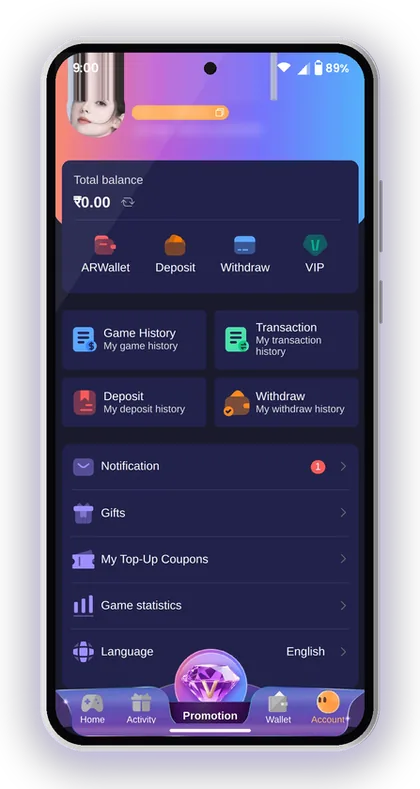
Each record answers a different question. Game history covers what you bet and what happened. Transaction covers why your balance moved. Deposit and Withdraw history only track money going into or out of your account. Game statistics puts your betting into totals so you can see the bigger picture.
A common mistake is to check only the balance at the top of the Account page. The balance tells you where you stand now, but not how you got there. When a number looks wrong, the records are where you find the reason.
- My game history: every bet you placed and its result
- Transaction: every credit and debit in your account
- Deposit: your deposit orders and their status
- Withdraw: your withdrawal requests and their status
- Game statistics: your betting activity in totals
- Gifts and My Top-Up Coupons: gift codes and coupons you have redeemed
Helpful Hint: Open the Account page once a week and check all five records together. A small gap is much easier to sort out early than weeks later.
My Game History Vs The In-Game History Tabs
The lottery games keep their own records too. Inside Win Go, K3, 5D and Trx Win Go you will see three tabs under the betting buttons: Game history, Chart and My history. They are easy to mix up, and many new players read the wrong one.
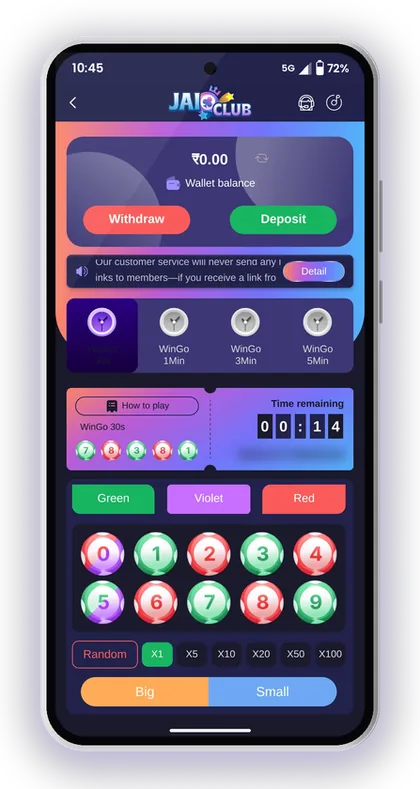
My game history on the Account page gathers your bets from all games in one place. The tabs inside a game only cover that single game and the round length you have open, such as WinGo 30s or K3 5 mins.
| Tab | What It Shows | Best Use |
|---|---|---|
| Game history | Results of past rounds for all players | Checking what a round actually drew |
| Chart | Past results as a trend | Seeing how results spread over time |
| My history | Only your own bets in that game | Checking your bet, amount and win or loss |
Game History Vs Chart Vs My History
Game history inside a game shows the results of past rounds for everyone, such as the number, Big or Small and the colour in Win Go. My history shows only your own bets in that game. Chart shows the same past results drawn as a trend so patterns are easier to see.
Kindly avoid using the Chart to forecast outcomes. Each round is purely a matter of luck, and Small does not become any more probable even if Big has appeared five times running. The chart only shows how past results have been spread out, and it can't help you choose what comes next.
What Does The Period Number Mean?
The period number is the unique ID of one round. Every result and every bet is tied to a period, so it is the most useful detail when you want to prove what happened in a certain round.
Say you bet on Green in WinGo 1Min and the win never reached your balance. Note the period number from My history, then match it to the same period in Game history. If the result shows Green, you have clear proof to send support.
Checking Trx Win Go Results With Block Data
Trx Win Go keeps a blockchain record for every round, covering the period, block height, block time, hash value and result. As the result comes from the hash of a publicly available block, this version also provides a Public Chain Query button.
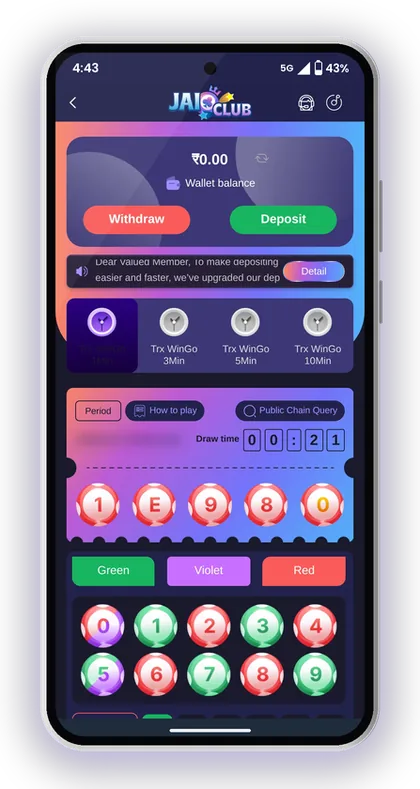
This gives you something the other lottery games do not. You can take the block height from the game history and check the same block yourself on a public blockchain explorer. If the hash matches, the result came from that block and nothing else.
Most players will never need this, but it helps if you doubt a result. Write down the period and block height first, then compare. If something does not match, that pair of details is the proof support will want.
Helpful Hint: Trx Win Go rounds run at 1, 3, 5 and 10 minutes. Note which one you played, because each round length has its own history.
Jai Club Transaction History: Reading Every Credit And Debit
The Transaction record lists every movement in your balance, including deposits, withdrawals, bets, wins, bonuses and commissions. If your balance is different from what you expected, this is the first record to open.
Think of it as a bank statement for your account. Your game history tells you a bet was won. The Jai Club transaction history shows the exact moment the win amount reached your balance.
Why A Bonus Shows As A Separate Line
Bonuses from the Activity page, such as Attendance bonus, Betting rebate or the First Deposit Loss Rebate, appear as their own entries and do not merge into your deposit. That keeps it clear how much of your balance came from your own money and how much came from rewards.
This matters when you withdraw. The withdrawal steps say your total bet must be 0 first, and bonus money often adds to the betting you still need to complete. Check the bonus entries so a withdrawal block does not catch you by surprise.
Spotting Agent Commission Credits
When you invite friends, the commission for the previous day is calculated at 01:00 each morning and then credited to your wallet. A new commission entry should appear in your transactions every morning.
If the commission line is missing, check the Promotion page first. Commission detail and Subordinate data show whether your invitees actually deposited or played. No activity from them means no commission, and that is not an error.
Helpful Hint: Before you make a big bet, scroll the last day of transactions. You will often find a bonus or rebate you forgot to use.
Deposit History And Withdraw History: Tracking Your Money
Deposit history and Withdraw history only show payment orders, each with its amount, time and status. You can open them from the Account page or from the Wallet page, and the Deposit screen itself also shows your recent orders.
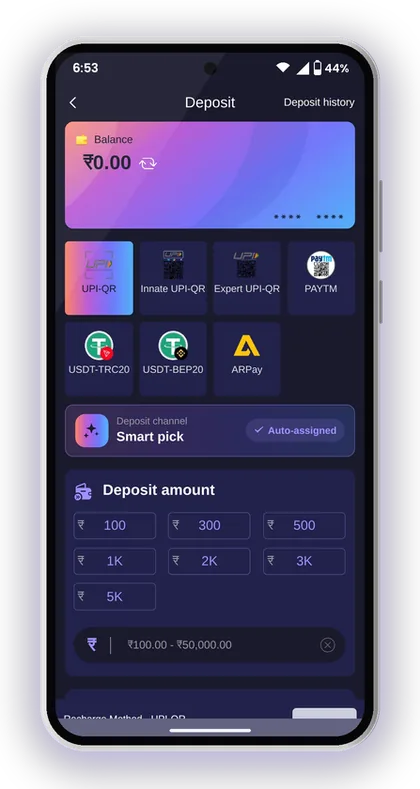
These two records are the ones support asks about most. Keep them tidy by creating one order at a time and finishing the payment before you start another.
What To Do If A Deposit Does Not Show
Begin by confirming that the order is listed in Deposit history and that the amount you paid matches it exactly. For instance, if the order was created for ₹500 but you sent ₹550 through UPI, the two figures differ, so the system cannot credit it on its own. Also be sure you did not cancel the order after making the payment, as the deposit rules caution against doing so.
If the transfer time ran out before you paid, fill in the deposit form again. Do not reuse the old payment. The full payment steps are on the Jai Club deposit page, and Paytm users can follow how to make a Jai Club Paytm deposit to avoid amount mistakes.
Tracking A Pending Withdrawal
Your Withdraw history shows each request and its current status. A pending status means the request is still being processed. It does not mean it failed, so do not send several new requests for the same money, because each one uses up one of your daily attempts.
Before you ask anyone, check that you sent it during the method's withdrawal hours and that your bank or UPI details are correct. For timings, limits and what to do when it stays pending, see the Jai Club withdrawal time and pending guide.
Helpful Hint: Save your UPI reference number or USDT hash ID the moment you pay. Bank apps can take a while to show older payments later.
Wallet Totals, Main Wallet And 3rd Party Wallet
At the top of the Wallet page you will find two all-time figures: Total deposit amount and Total Withdrawal Amount. Under these sits your balance, divided into the Main wallet and the 3rd party wallet, along with a Main wallet transfer button.
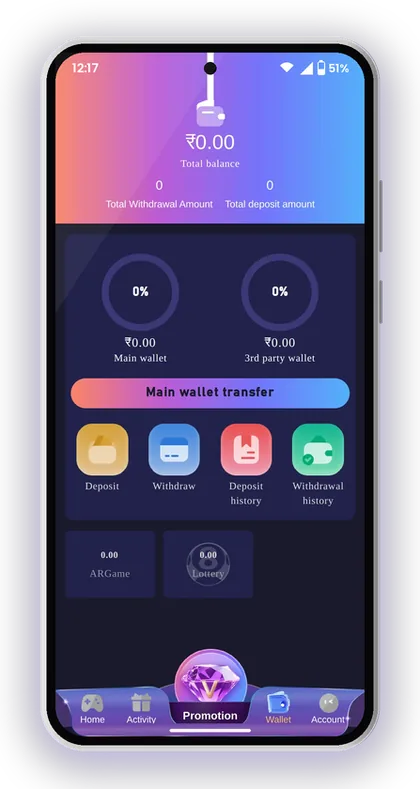
These totals are the most honest number in the app. Take your total deposits away from your total withdrawals and you have your real result so far, with no bonuses or recent wins to cloud it.
Why Your Balance Looks Lower After Playing A Slot
Games from outside providers, such as JILI slots or SPRIBE's Aviator, usually run on their own balance. When you open them, money can move from the Main wallet into the 3rd party wallet. So the main balance looks lower even though nothing was lost.
Before you panic, check both wallet figures on the Wallet page. Add them together and compare that with your recent transactions. In most cases the missing amount is sitting in the 3rd party wallet.
When To Use Main Wallet Transfer
Tap Main wallet transfer to bring money back from the 3rd party wallet into your Main wallet. Do this before you withdraw, because withdrawals come out of the main balance.
A common mistake is trying to withdraw straight after a slot session and seeing too little balance available. Move the money back first, check that the Main wallet shows the right amount, then send your request.
Using Jai Club Game Statistics To Control Your Spending
Game statistics on the Account page sums up your betting activity so you see totals instead of single bets. Use it to answer one simple question: how much have I put into games over this period?
Single wins stick in your memory and losses fade quickly. The totals do not have that problem. If the Jai Club game statistics show far more betting than you planned, take that as your cue to slow down, whatever your last few rounds looked like.
Set a weekly playing budget before you deposit, for example ₹1,000. Then compare it with your statistics and your Wallet total deposit amount every week. Results in these games are random, so the budget is the only part you control.
- Set a fixed weekly playing budget before you make your first deposit
- Check Game statistics at the same time every week
- Compare Total deposit amount with Total Withdrawal Amount
- Stop for the week once your budget is used, even after a loss
- Never deposit again just to win back a loss
Helpful Hint: Only people aged 18 or over can play here, and this is real money. If you find yourself checking your records to chase losses, take a break.
How To Give Customer Care The Right Proof
Support can fix a payment or bet problem much faster when your first message already holds the right details. A vague message like "my money is missing" leads to rounds of questions. A message with an order number and a screenshot can often be sorted in one reply.
You can reach Customer Service from the Account page, or choose a contact method on the Jai Club customer care page. Genuine support staff never send links. If anyone posing as support shares one with you, don't click on it.
- Open the record that matches your problem: Deposit, Withdraw, Transaction or My game history
- Take a screenshot showing the order or period number, amount, time and status
- For deposits, add a screenshot of the payment from your UPI app with its reference number, or your USDT hash ID
- For a bet problem, screenshot My history and the same period in Game history
- Write one short message: what happened, when, the amount and the order or period number
- Send it all together and wait for a reply before creating new orders
Helpful Hint: Never share your login password or any OTP with anyone, even when the person says they work for support.
Viewing Records On The Jai Club Game Download Or Browser
Your records belong to your account and are not saved on your handset. After logging in with the same phone number or email, the same history appears on the Jai Club App and on the mobile website. Even if you switch to a new phone, your earlier records remain available.
If your history looks empty, first check that you logged in to the right account. Players who have two numbers sometimes open the wrong one. The Jai Club login page explains how to sign in and reset a password. For the Jai Club Game Download on Android, see the Jai Club APK download for Android.
A new player begins with a clean, empty history. An invite code is required to register, so type 385987864126 in the Invite Code field while signing up. Stay away from any "Jai Club Hack" or result-guessing app that claims it can read your history and predict rounds. No such hack exists, and these apps are scams designed to steal your login details or money.
Players Often Ask
Where can I see my Jai Club game history?
Tap the Account icon and open Game History to see your bets from all games. Inside each lottery game, the My history tab shows only your bets in that game and round length.
Where is the Jai Club transaction history?
It is on the Account page under Transaction. It lists every credit and debit, including deposits, withdrawals, bets, wins, bonuses and commission.
Why is my main wallet balance lower after playing a slot?
Games from outside providers often move money into the 3rd party wallet. Check both figures on the Wallet page, then use Main wallet transfer to bring the money back before you withdraw.
My deposit is not in my balance. What should I check first?
Open Deposit history and confirm the order is there, that you paid the exact amount and that you did not cancel it after paying. If it still does not show, send support a screenshot of the order and your UPI reference number or USDT hash ID.
Can the Chart in Win Go tell me the next result?
No. The Chart simply displays earlier results as a trend. Each round is random, so treat it as a way to understand what has already happened, not to guess the next result.
When does agent commission appear in my transactions?
The previous day's commission is calculated at 01:00 every morning and then credited to your wallet. If you can't see it, open Commission detail on the Promotion page and check whether your invitees were active.
Will my history show on a new phone?
Yes. Since your records are linked to your account, you can see them on any device once you log in using the same phone number or email.
Continue Reading
Jai Club withdrawal time and hours for UPI, bank and USDT, limits from ₹100 to ₹50,000, daily request cap, the steps and fixes for pending requests.

How to deposit at Jai Club via UPI, USDT and ARPay, with the ₹100 minimum, ₹50,000 UPI limit, recharge rules and what to do if funds don't show.

Jai Club customer care: find Customer Service in the app, share the right details for deposit or withdrawal issues, and spot fake support links.

Jai Club login steps for phone or email, password rules, OTP reset, app vs browser sign-in and fixes for common errors. New? Use invite code 385987864126.
Start On Jai Club
Create your Jai Club account with the official link and the invite code applied.