
How To Deposit Money Using Paytm On Jai Club
A Jai Club Paytm deposit takes four taps. Open Wallet, tap Deposit, choose the PAYTM tile, enter an amount between ₹100 and ₹50,000, then tap Deposit. The app gives you a payment screen with a QR code. Scan it with Paytm and pay the exact amount before the timer ends.
Most failed deposits come from small slips, not from the payment system. People send ₹501 instead of ₹500, pay after the order has expired, or cancel the order after the money has already left their bank. Each part below covers one step, explains why it matters and tells you what to check if your balance does not update.
- Minimum Deposit
- ₹100
- Maximum Deposit
- ₹50,000
- Quick Amounts
- ₹10K, 20K, 30K, 40K, 50K
- Payment Channel
- Smart pick, auto-assigned
Inside This Page
What Is A Jai Club Paytm Deposit?
A Jai Club Paytm deposit means adding rupees to your game balance through the PAYTM tile on the Deposit page. It works on UPI, so you can pay from the Paytm app by scanning the QR code the app shows you.
Paytm is one of several UPI tiles on the Deposit page. They all accept the same ₹100 to ₹50,000 range, so pick Paytm because it suits you, not because you expect better limits.
Is The Paytm Tile Different From Normal UPI?
Not really. The PAYTM tile has the same ₹100 to ₹50,000 range as the other UPI tiles and the same Smart pick channel. The only difference is the label you tap. The money still moves through UPI from your linked bank account.
Where it does help is with habit. If Paytm is the app you already use for bills and shopping, your UPI PIN, bank and daily transfer limit are already set up there. You make fewer mistakes when you pay from the app you know best.
Do You Need The Jai Club App For Paytm?
No, there's no difference. Whether you use the Jai Club app or the mobile website, a Paytm deposit opens the same Deposit page, with identical tiles and limits. If you want the app, the download button sits in the top right corner of the homepage.
One practical point: deposits run more smoothly when the game and Paytm are on the same phone. You switch to Paytm, pay and come back without losing the order screen. Paying from another phone works too, but it is easier to slip on the amount.
Before You Pay: Jai Club Register And Login
Before you can deposit, you must have an account, and Jai Club doesn't allow sign-up without an invite code. While creating your account, type 385987864126 into the Invite Code field. Just your mobile number and an OTP are needed, so the whole thing takes around a minute.
Already have an account? Open the Jai Club login page, enter your password along with your registered phone number or email, and then go straight to the next section. If you are new, please finish the steps below first:
- Head to the Register page and key in your mobile number with the +91 code.
- Pick a secure password that combines capital and small letters with digits, then type it again to confirm it.
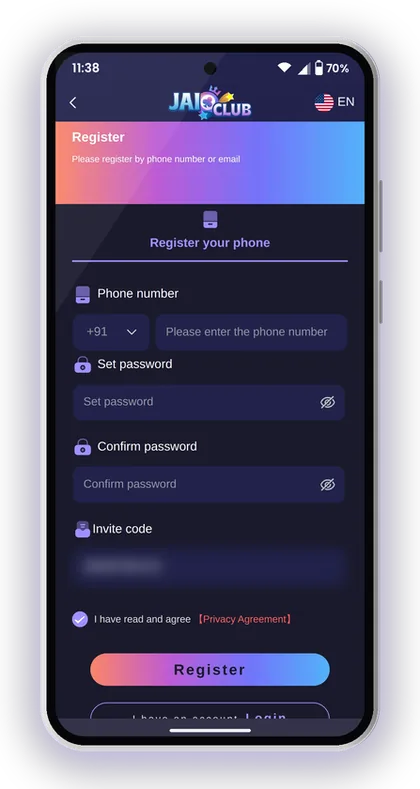
- Enter 385987864126 in the Invite Code field.
- Tap Send and type in the verification code sent to your phone.
- Tick the Privacy Agreement box and tap Register.
Helpful Hint: Write your password down somewhere safe before you deposit. You will need it again for every withdrawal.
How To Deposit Money Using Paytm On Jai Club
Tap the Wallet icon at the bottom of the screen, press Deposit and pick the PAYTM tile. Keep the channel on Smart pick, type in your amount and tap Deposit to reach the payment screen.
The full order is below. Follow it in this order every time. Most problems start when a player opens Paytm and pays from memory before the app has created the order.
- Sign in, then press the Wallet icon on the bottom bar.
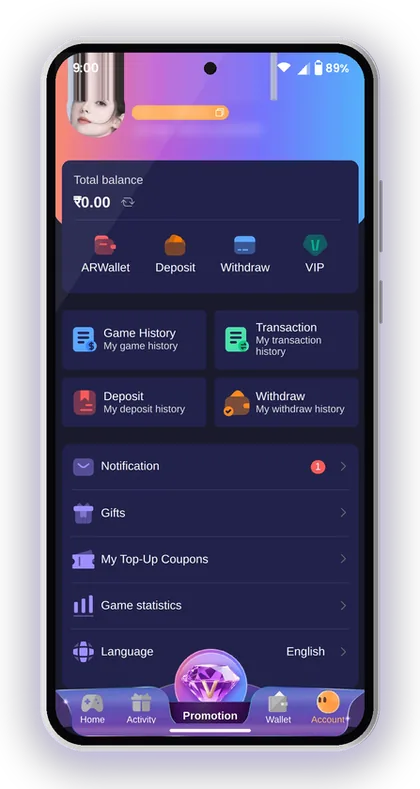
- Tap Deposit to open the payment options.
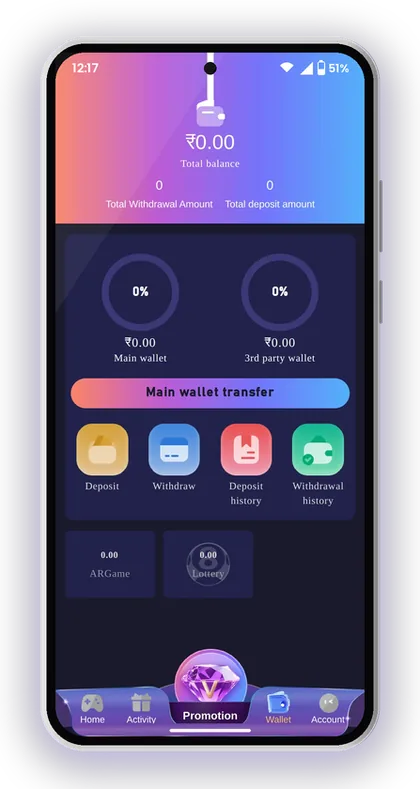
- Select the PAYTM tile at the top of the page.
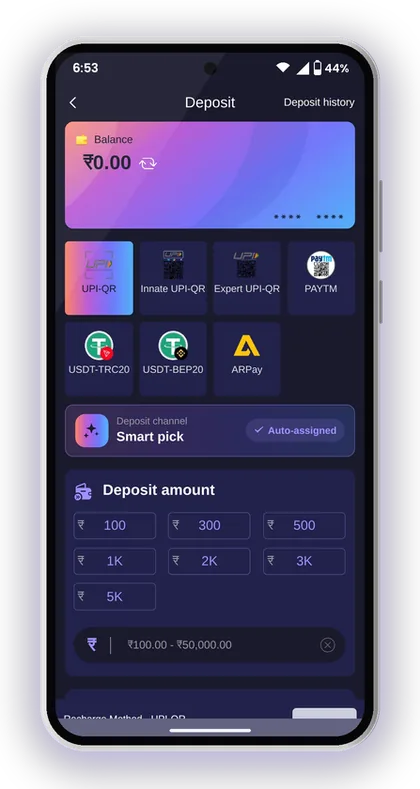
- Keep the deposit channel on Smart pick (auto-assigned).
- Type an amount from ₹100 to ₹50,000, or tap one of the quick-amount buttons.
- Tap Deposit to create the order.
- Scan the QR code with Paytm and pay the exact amount shown.
- Wait on the screen until the payment is confirmed. Do not cancel the order.
Helpful Hint: Take a screenshot of the Paytm success screen with the UTR or transaction number. You only need it if something goes wrong, but by then it is often too late to find it.
Jai Club Paytm Deposit Limits And Quick-Amount Buttons
The PAYTM tile accepts ₹100 minimum and ₹50,000 maximum for each deposit. These limits also apply to the other UPI tiles. There is more about every method on the main Jai Club deposit page.
Under the amount box are five quick-amount buttons: 10K, 20K, 30K, 40K and 50K. Tapping one fills in ₹10,000 to ₹50,000. They save time, but they also make it easy to put in far more than you meant to.
| Detail | PAYTM Tile |
|---|---|
| Minimum per deposit | ₹100 |
| Maximum per deposit | ₹50,000 |
| Quick-amount buttons | ₹10K, ₹20K, ₹30K, ₹40K, ₹50K |
| Channel | Smart pick (auto-assigned) |
| How you pay | Scan the QR code with Paytm |
Should You Use The Quick-Amount Buttons?
Use them only when one of those amounts is what you had already planned to deposit. The smallest button is ₹10,000, which is a lot for a new player who only wanted to try a few Win Go rounds with ₹200 or ₹500.
For small amounts, type the number yourself and check it twice before you tap Deposit. A common mistake is tapping 10K by accident, ignoring it, and then sending ₹500 from Paytm. That creates an amount mismatch, and that deposit will not be credited automatically.
Why Your Paytm Daily Limit Also Matters
The game accepts up to ₹50,000 per deposit, but your bank and UPI app have their own daily limits. If your bank limit is lower than the amount you entered, the Paytm payment fails before any money reaches the platform.
Check your bank's UPI limit before making a large deposit. If you plan to add a big amount, split it into two orders that both fit within your bank's limit. Each order should be created and paid separately, with its own QR code.
Pay The Exact Amount Before The Timer Runs Out
Each order expires after a set time, and the amount you pay has to match the order exactly. As per the recharge instructions, a transfer that differs from the order you created can't be credited, and the platform takes no responsibility for a wrongly entered amount.
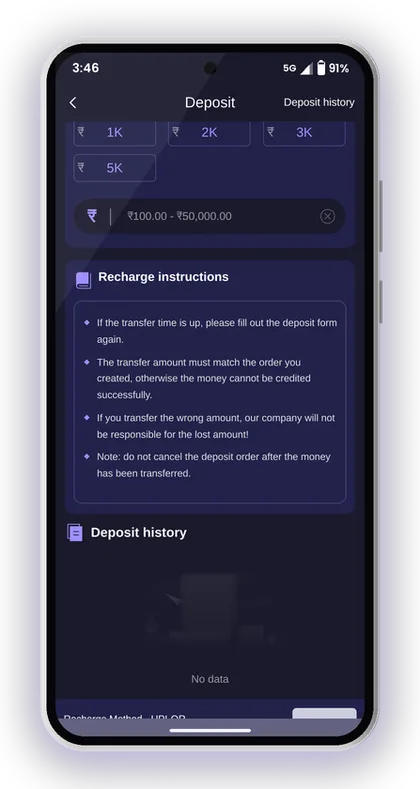
If the time runs out before you pay, fill in the deposit form again to get a new order. Do not pay to an old QR code.
What Happens If You Send The Wrong Amount?
The system matches your payment to the order by the amount. If you created a ₹500 order and sent ₹550 or ₹450, the system cannot connect them, so your balance stays the same. The platform's rules say it is not responsible for money lost this way.
Your only option then is to contact support with proof, and there is no promise of a refund. That is why typing the amount yourself in Paytm is risky. When you scan the QR code, check that the amount Paytm shows is the same as your order, to the rupee.
Why Old QR Codes Should Never Be Reused
Each deposit gets its own payment details through the Smart pick channel, which is auto-assigned. The channel can change between orders, so a QR code from yesterday may no longer point to an active account.
Players who save a QR code to their gallery and pay to it again often lose that deposit. Always create a new order from the Deposit page and scan the code it shows you right away. If you get distracted and the timer runs out, start over.
Helpful Hint: Keep Paytm open and unlocked before you tap Deposit, so you have the full timer to scan and pay.
What To Do If Your Paytm Deposit Does Not Show
Above all, don't cancel the order. The recharge instructions warn against cancelling a deposit order once the money has been sent, since that cuts the connection between your payment and your account.
Say you paid ₹500 through Paytm, saw the success tick, but your balance is still the same. Wait a few minutes, refresh the Wallet, then open your deposit history to check the order status.
- The Paytm amount matches the order to the rupee
- You paid before the order timer ran out
- The order was not cancelled after paying
- You have the UTR number from your Paytm receipt
- The order appears in your deposit history
Never Cancel After Paying
Once the money has left your bank, the open order is the only thing that ties the payment to your account. Cancel it and the system no longer knows which player sent that ₹500, even though the money arrived.
New players often cancel out of panic because the balance did not change in ten seconds. Bank confirmations are sometimes slow. Leave the order alone, keep your Paytm receipt and give it time before you do anything else.
When To Contact Customer Service
If the order still shows as pending or failed after a reasonable wait, contact support from the Customer Service option in your Account menu. Send the order details from deposit history and your Paytm screenshot showing the amount, date and UTR number.
Reach out to support only via the option available within the app. According to the platform, its customer service staff never send links to members, so anyone who sends you a link while posing as support is a scammer. If you need more help, go to the Jai Club customer care page.
Helpful Hint: Don't give your OTP or UPI PIN to anyone claiming to be from support. A genuine deposit check never asks for either.
Paytm Vs Other Deposit Methods On Jai Club
For most players in India, Paytm or any other UPI app is the easiest way to deposit rupees. You pay from your bank in a few seconds without dealing with crypto wallets or network fees.
USDT is a good fit if you already own crypto. USDT tiles start at 10 USDT, and the network you select must be the right one. ARPay runs through a separate AR Wallet, which has to be activated before you use it.
| Method | Minimum | Best For |
|---|---|---|
| Paytm (UPI) | ₹100 | Everyday rupee deposits from your bank |
| USDT | 10 USDT | Players who already hold crypto |
| ARPay | Check the ARPay tile | Players using AR Wallet |
When USDT Makes More Sense Than Paytm
USDT is useful if your bank keeps blocking or limiting UPI payments to gaming apps, or if you already keep money in a crypto wallet. It also avoids your bank's daily UPI limit.
The downside is that mistakes are harder to fix. Sending on the wrong network or to an old address can mean the money is gone for good. For a first deposit of a few hundred rupees, Paytm is simpler and easier to sort out if something goes wrong.
Is AR Wallet Worth Setting Up?
AR Wallet is a third-party wallet that uses ARB. The platform says recharges through AR Pay take about 5 seconds, and you can sell ARB back to rupees through UPI when you need to.
It adds an extra app and an extra step between your bank and the game. If you are just starting out, deposit through Paytm first. Look at AR Wallet later, after you have read its transaction rules on the deposit page.
Check Your Deposit In The Transaction Records
Every Paytm deposit appears in My deposit history under the Account menu, and in the Deposit history link on the Wallet page. That record is your proof if you ever need to raise a complaint.
Get into the habit of checking your history after every deposit, not just when something goes wrong. If you know what a normal successful order looks like, a stuck one is easy to spot.
Deposit History Vs Transaction History
Deposit history lists only the money you added, with each order's amount and status. Transaction history shows every movement in your account, including bets, bonuses and withdrawals. Use the first to check one Paytm payment and the second to see your full balance.
If your balance looks lower than you expected after a deposit, compare both lists before assuming the deposit failed. Often it went through and was spent on bets you forgot about. The Jai Club transaction history page explains each record in detail.
Using Your First Paytm Deposit Wisely
Before your first deposit turns into a bet, settle on an amount you can easily afford to lose. Win Go and similar games give random outcomes, and no chart pattern can alter that. Begin with a small stake, say ₹100 to ₹500, until the rounds make sense to you.
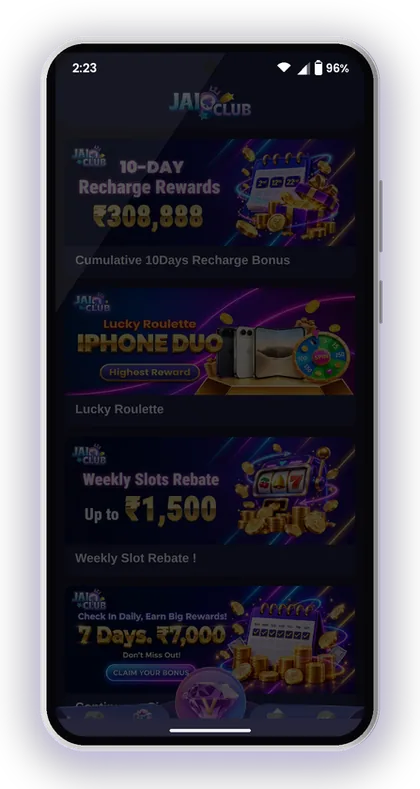
Look at the Activity page before your first deposit, because some offers depend on it. The First Deposit Loss Rebate lists a 35% return for new users who lose on their first deposit, capped at ₹150. Check all current terms on the Jai Club bonus page.
Know The Odds Before You Bet
Big/Small and colour bets look like 50-50, but the numbers 0 and 5 are also violet, which changes the maths. Read Win Go big small odds in plain maths before you bet a large part of your deposit on one colour.
Real money gaming is meant only for users who are 18 or older, and the platform itself warns that gambling can become addictive. Set a limit before every session and stop as soon as you reach it, even if you're winning.
Ignore Any Jai Club Hack Offer
No Jai Club hack, prediction tool or 'guaranteed signal' group exists that can tell you the next result. People selling these usually ask for a deposit or a fee and then disappear. Every result is random.
The same goes for anyone offering to deposit for you through a link. Only deposit from the Wallet page inside your own account. You will find more safe-play tips on the Jai Club blog.
Helpful Hint: Withdrawals require your total bet requirement to be 0, so check it in the Wallet before you plan to withdraw.
Players Often Ask
What is the minimum Jai Club Paytm deposit?
The minimum is ₹100 per order on the PAYTM tile. The maximum is ₹50,000 per order. If you need more than that, create a second order and pay it separately.
Where is the Paytm option on Jai Club?
Tap the Wallet icon, then Deposit, and select the PAYTM tile at the top of the page. Leave the channel on Smart pick, enter your amount and tap Deposit to get the QR code.
Why has my Paytm payment not been added to my balance?
The most common reasons are a different amount from the order, paying after the timer ran out, or cancelling the order after paying. Check the order in your deposit history. If it is still pending, contact Customer Service with your Paytm receipt and UTR number.
Can I cancel a deposit after paying through Paytm?
No. The recharge instructions say you must not cancel a deposit order once the money has been transferred. Cancelling can stop the payment from being matched to your account.
What do the 10K to 50K buttons do?
They fill in ₹10,000, ₹20,000, ₹30,000, ₹40,000 or ₹50,000 as your deposit amount. For smaller deposits, type the amount yourself and check it before you tap Deposit.
Do I need an invite code to deposit with Paytm?
First you need an account, and signing up requires an invite code. Put 385987864126 in the Invite Code field while registering. Once that's done, you can deposit through Paytm immediately.
Can I pay the same QR code again next time?
No. The channel is auto-assigned for each order, so always create a new deposit order and scan the code it shows you. Paying to an old QR code can mean the deposit is never credited.
Continue Reading
How to deposit at Jai Club via UPI, USDT and ARPay, with the ₹100 minimum, ₹50,000 UPI limit, recharge rules and what to do if funds don't show.

Jai Club bonus offers explained: 35% first deposit rebate, invitation rewards, Super Jackpot, wheel spin, gift codes, points and agent commission.

Jai Club customer care: find Customer Service in the app, share the right details for deposit or withdrawal issues, and spot fake support links.

Jai Club Win Go odds in plain maths: real chances for big, small, red, green, violet and number bets, how 0 and 5 work, and the bets that are not allowed.
Start On Jai Club
Create your Jai Club account with the official link and the invite code applied.